- PRODUCTS
- Pexels Phones
- Google Pixel Tablet Price in Nigeria
Google Pixel Tablet Price in Nigeria
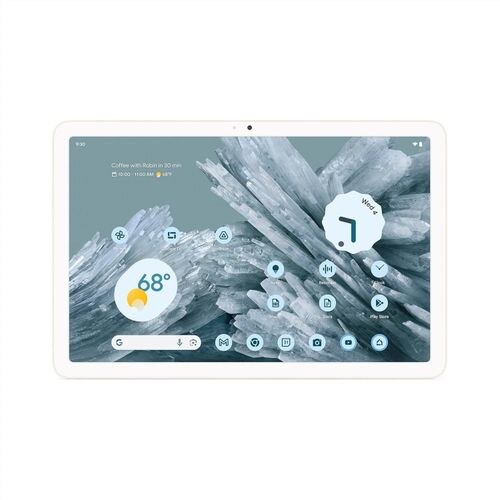

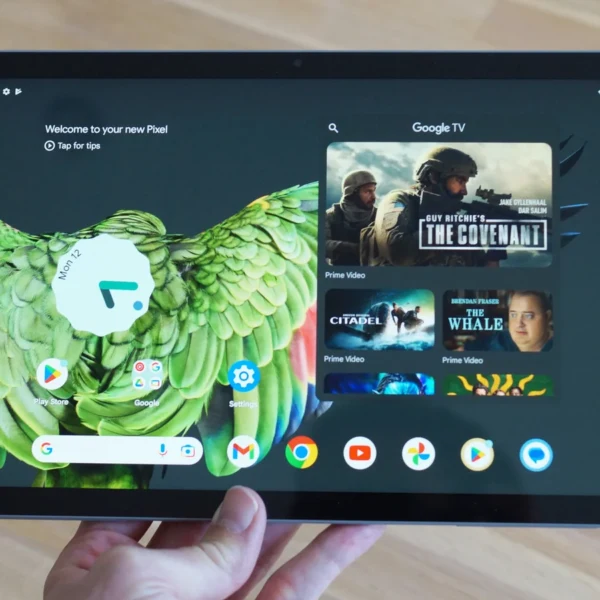
-
DISPLAY: 10.95 inches, 347.7 cm2 (~79.7% screen-to-body ratio)
-
CAMERA: 8 MP, f/2.0, 24mm (wide), 1/4.0", 1.12µm
-
BATTERY: Li-Po 7020 mAh (27 Wh)
-
OS: Android 13, upgradable to Android 15
-
CHIPSET: Google Tensor G2 (5 nm)
-
RAM: 128GB 8GB RAM, 256GB 8GB RAM
-
SIM: No Stylus support
The Google Pixel Tablet Price in Nigeria and Slot is 900,000 Naira, and this includes Lagos, Abuja, Kano, Rivers, Ogun, Oyo, Delta, Kaduna, Edo, Enugu, Port Harcourt, Ibadan, Benin, Owerri, and Warri.
Unlike Samsung or Lenovo tablets that focus heavily on performance or budget, Google designed this device around the idea of “always-connected home usage” with Pixel ecosystem integration.
But in Nigeria, where tablets are usually used for school, Netflix, business presentations, and light work, the real question becomes:
Is the Google Pixel Tablet actually useful in Nigeria in 2026, or is it just an expensive smart display?
Let’s break it down.
Google Pixel Tablet Price in Nigeria (2026)
The Google Pixel Tablet price in Nigeria is estimated at:
- ₦600,000 — ₦1,200,000
Pricing varies based on:
- Storage version (128GB or 256GB)
- Import source
- Dollar exchange rate
- Whether it includes charging dock
- Condition (new or UK-used)
Since it’s not officially sold in Nigeria, availability depends heavily on importers and online tech retailers.
Design and Build Quality — Simple but Premium
The Pixel Tablet follows a very minimal design philosophy.
It has:
- Clean aluminum finish
- Rounded edges
- Slim 8.1mm body
- Lightweight tablet feel
At 493g, it is not too heavy, making it comfortable for:
- Watching movies
- Reading documents
- Light productivity tasks
- Browsing
It does not try to look flashy — instead, it feels calm and functional.
One unique thing is the magnetic dock system, which turns the tablet into a smart display when not in use.
Display Experience — Good for Media, Not for Creators
The 10.95-inch display is sharp enough for everyday use.
It works well for:
- Netflix
- YouTube
- Online classes
- Reading PDFs
- Casual browsing
The 16:10 aspect ratio is especially good for video content.
However, it is still an IPS LCD panel, not OLED. That means:
- Blacks are not super deep
- Contrast is average compared to premium tablets
- Not ideal for professional color work
For entertainment, it performs well. For creative professionals, it is just okay.
Performance Review — Smooth for Daily Use
Powered by Tensor G2, the Pixel Tablet is not a performance monster, but it is stable.
Everyday Use
It handles smoothly:
- Chrome browsing
- Google Docs
- YouTube
- Zoom meetings
- Light multitasking
Android tablet optimization has improved, but it is still not on iPad level efficiency.
Gaming Performance
Games like:
- Asphalt 9
- PUBG Mobile
- Call of Duty Mobile
run smoothly on medium settings.
However, this is not a gaming tablet. Extended gaming sessions are limited by:
- Moderate GPU power
- Heat buildup under load
Camera Performance — Basic but Functional
The Pixel Tablet is not designed for photography.
- 8MP rear camera
- 8MP front camera
These are mainly for:
- Video calls
- Scanning documents
- Online meetings
Video quality is fine for Zoom or Google Meet, but not suitable for serious content creation.
Battery Life — One of Its Strong Points
The 7020mAh battery performs well for a tablet in this category.
On normal usage:
- Streaming videos
- Browsing
- Reading
- Light productivity
…it can easily last a full day or more.
The magnetic charging dock also makes it convenient to keep charged at home.
However, charging speed is not fast compared to modern Android tablets.
Software Experience — Where Google Focuses the Value
The Pixel Tablet is heavily software-driven.
It includes:
- Split-screen multitasking
- Google Assistant integration
- Smart home controls
- Pixel ecosystem syncing
- Chromecast-like functionality via dock
When docked, it turns into:
- Smart display
- Digital photo frame
- Home control hub
This is where Google’s vision is clear — it is not just a tablet, but a smart home device.
Real-World Usage in Nigeria
In Nigeria, the Pixel Tablet fits best in specific use cases:
Good for:
- Students (online learning, PDFs, research)
- Business presentations
- Netflix and YouTube streaming
- Office productivity
- Home entertainment
Not ideal for:
- Hardcore gaming
- Professional video editing
- Mobile data users (no SIM support)
- Travelers needing portability internet access
Since it is Wi-Fi only, it is more of a home or office device.
Pros and Cons of Google Pixel Tablet
Pros
- Clean Android tablet experience
- Smooth everyday performance
- Good display for media consumption
- Strong battery life
- Excellent smart home integration
- Useful charging dock system
- Premium build quality
Cons
- No SIM card support
- Not a gaming-focused tablet
- LCD instead of OLED display
- Limited camera quality
- Charging is relatively slow
- Expensive for its performance class
Google Pixel Tablet vs Samsung Galaxy Tab S9 FE
Samsung Galaxy Tab S9 FE offers:
- Better performance tuning
- S Pen support included
- Cellular variant available
- Stronger productivity features
Pixel Tablet offers:
- Better smart home integration
- Cleaner Android experience
- Simpler UI
- Better speaker setup for media
Samsung is more productivity-focused, while Google focuses on home ecosystem usage.
Who Should Buy Google Pixel Tablet?
This tablet is ideal for:
- Home users who stream content
- Students using Wi-Fi networks
- Users already in the Google ecosystem
- People who want a smart display + tablet combo
- Light productivity users
Who Should Avoid It?
You should avoid it if you:
- Need mobile SIM connectivity
- Want strong gaming performance
- Need professional creative tools
- Prefer high-end OLED displays
- Want fast charging performance
Frequently Asked Questions (FAQ)
Does the Pixel Tablet support SIM card?
No, it is Wi-Fi only.
Can you use the Pixel Tablet for gaming?
Yes, but only casual gaming.
Is Pixel Tablet good for students?
Yes, especially for online learning and research.
Does it come with a stylus?
It supports stylus input, but it is sold separately.
Can it replace a laptop?
Not fully. It is better for light tasks, not heavy productivity.
Is Pixel Tablet worth buying in 2026?
Yes, if you want a media and smart home device, not a performance tablet.
Final Verdict
The Google Pixel Tablet is not trying to compete with high-performance tablets — it is trying to redefine how a tablet fits into a smart home environment.
In Nigeria, it is best seen as:
- A Netflix and YouTube machine
- A student study companion
- A Google smart home controller
- A casual productivity device
It is not for power users, gamers, or professionals needing full desktop-level performance.
If you understand its purpose, it becomes a useful and enjoyable device. If not, it may feel overpriced for what it offers.
Specs
NETWORK
| Technology | No cellular connectivity |
LAUNCH
| Release Date | 2023, May 10 |
| Status | Available. Released 2023, June 20 |
BODY
| Dimensions | 258 x 169 x 8.1 mm (10.16 x 6.65 x 0.32 in) |
| Weight | 493 g (1.09 lb) |
| Build | Glass front, aluminum frame, aluminum back |
| SIM | No Stylus support |
DISPLAY
| Type | IPS LCD |
| Size | 10.95 inches, 347.7 cm2 (~79.7% screen-to-body ratio) |
| Resolution | 1600 x 2560 pixels, 16:10 ratio (~276 ppi density) |
PLATFORM
| OS | Android 13, upgradable to Android 15 |
| Chipset | Google Tensor G2 (5 nm) |
| CPU | Octa-core (2x2.85 GHz Cortex-X1 & 2x2.35 GHz Cortex-A78 & 4x1.80 GHz Cortex-A55) |
| GPU | Mali-G710 MP7 |
MEMORY
| Card slot | No |
| Internal | 128GB 8GB RAM, 256GB 8GB RAM |
MAIN CAMERA
| Back | 8 MP, f/2.0, 24mm (wide), 1/4.0", 1.12µm |
| Features | HDR, panorama |
| Video | 1080p@30fps |
SELFIE CAMERA
| Front | 8 MP, f/2.0, 24mm (wide), 1/4.0", 1.12µm |
| Features | HDR, panorama |
| Video | 1080p@30fps |
SOUND
| Loudspeaker | Yes, with stereo speakers (4 speakers) |
| 3.5mm jack | No |
COMMS
| WLAN | Wi-Fi 802.11 a/b/g/n/ac/6, dual-band |
| Bluetooth | 5.2, A2DP, LE |
| Positioning | No |
| NFC | No |
| Radio | No |
| USB | USB Type-C 3.2 (Gen 1), magnetic connector |
FEATURES
| Sensors | Accelerometer, gyro, compass, proximity (accessories only) Ultra Wideband (UWB) support |
BATTERY
| Type | Li-Po 7020 mAh (27 Wh) |
| Charging | 15W wired |
MISC
| Models | GA06156-EU, GA06157-EU, GA06158-EU |
| Colors | Porcelain, Hazel, Rose |
Reviews
Disclaimer Note
Disclaimer: We don't guarantee that the information on our page is 100% correct.


